 flutterware
Launcher icon
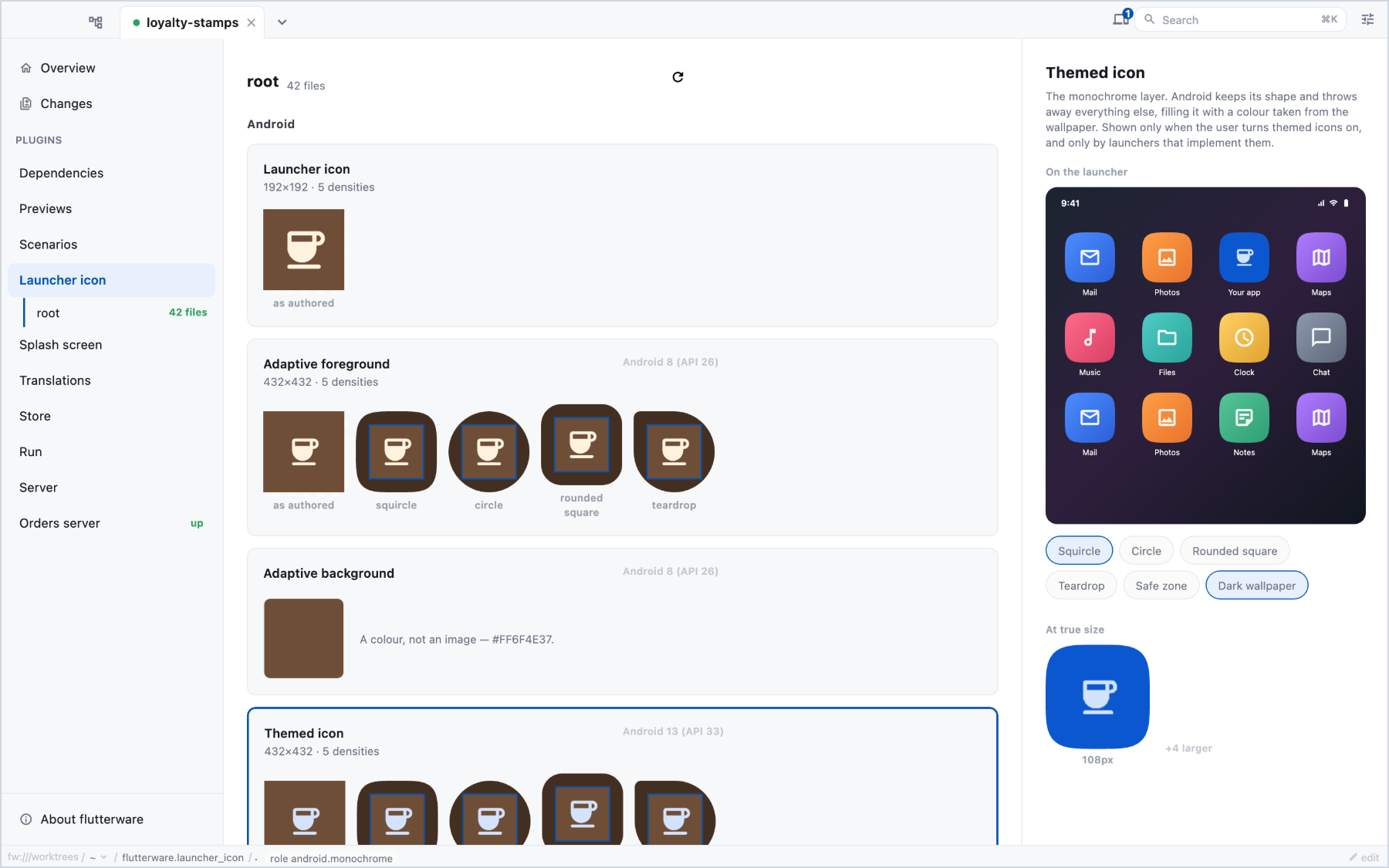
Every app icon your project ships, on every platform, and what each operating system does to it: the mask iOS applies, the shapes Android launchers crop an adaptive icon to, the padding the macOS Dock expects.
Turn it on#
// tool/flutterware.dart
fw.use(LauncherIcon(packages: [.new(app)]));
It reads the icons that are actually on disk (the Android mipmap-* folders,
the iOS and macOS asset catalogs, the web manifest), however they got there. It
doesn't generate icons and doesn't need flutter_launcher_icons.
In the studio#
One card per icon, grouped by platform. Each shows the file as it was drawn next to how the platform will display it. Pick one to see it where it is actually seen.
The panel also points out what would go wrong on a device or in review:
- icon files on disk that nothing in the project points at, and references to images that don't exist,
- a themed Android icon with no monochrome layer, which Android 13 and later then ignore,
- iOS icons with an alpha channel, which App Store Connect rejects,
- an image whose pixel size doesn't match what the asset catalog declares.
For apps with flavors, a picker shows each flavor's icons laid over the main ones, the way Gradle resolves them.
From the command line or an agent#
fw run launcher_icon inventory
fw run launcher_icon inventory --flavor=staging