 flutterware
Server inspection — adapter snippets
This is for Dart servers, and the reason is the import. A server announces
itself by importing package:flutterware/server.dart in its own process and
calling into it, so what it inspects is whatever runs Dart. A backend written
in anything else — a .NET or Go API beside your Flutter app, which is an
ordinary shape for a repo to have — gets nothing from this and cannot be made
to: there is no out-of-process shipper, no agent and no log format to point at
it, and none is planned. A mixed-stack repo should expect to inspect its Dart
services here and its others wherever it already does.
package:flutterware/server.dart ships primitives only: event,
span/spanSync, handle, and zone correlation. Everything that binds them
to a specific framework or driver is a snippet on this page that you paste
into your server and own — deliberately, so the package stays dependency-free
and the redaction and capture policy is code you can read and edit (design
doc: docs/superpowers/specs/2026-07-30-server-inspection-design.md,
decisions 5 and 11).
A live, runnable version of the shelf + logging snippets is
fixtures/probe_app/bin/example_server.dart.
Everything below is inert in release builds (dart compile / dart build)
and on machines without ~/.flutterware/run; there is no init call — the
first event publishes the server.
Describe the server: FlutterwareServer.info#
The one piece that is typed API rather than a snippet, because both halves
speak it: where the server listens, which environment, what it talks to,
and the pages worth a click. The GUI's Details popover on the panel header
renders it — reachable from every pane, because which database you are pointed
at is context for all of them — the environment chip and base URL sit beside
the title, and flutterware_invoke's info action returns it to agents.
var server = await shelf_io.serve(handler, InternetAddress.loopbackIPv4, 8080);

FlutterwareServer.info(ServerInfo(
  baseUrl: 'http://localhost:${server.port}',   // after serve — the real port
  environment: 'dev',
  links: [
    ServerLink('Health', '/health'),            // relative resolves via baseUrl
    ServerLink('API docs', '/docs', description: 'OpenAPI UI'),
  ],
  connections: [
    ServerConnection('postgres', connectionString, label: 'main'),
  ],
  config: {
    'Feature flags': {'newCheckout': true},
  },
));
Call it again any time — each call replaces only the sections it names, so
re-publishing config: after a flag flips leaves the links alone.
Passwords in a DSN and secret-shaped config keys (apiKey, token, …) are
masked wherever they are displayed, with click-to-reveal in the GUI; still,
publish only what you are willing to have on a developer's screen.
baseUrl and environment are also mirrored into the server's handle
file, so fw status and the GUI's sidebar can say
pid 4242 · http://localhost:8080 · dev without attaching — and a request
in the GUI gains a copy as curl button, built from baseUrl plus the
captured headers and body.
HTTP in: shelf middleware#
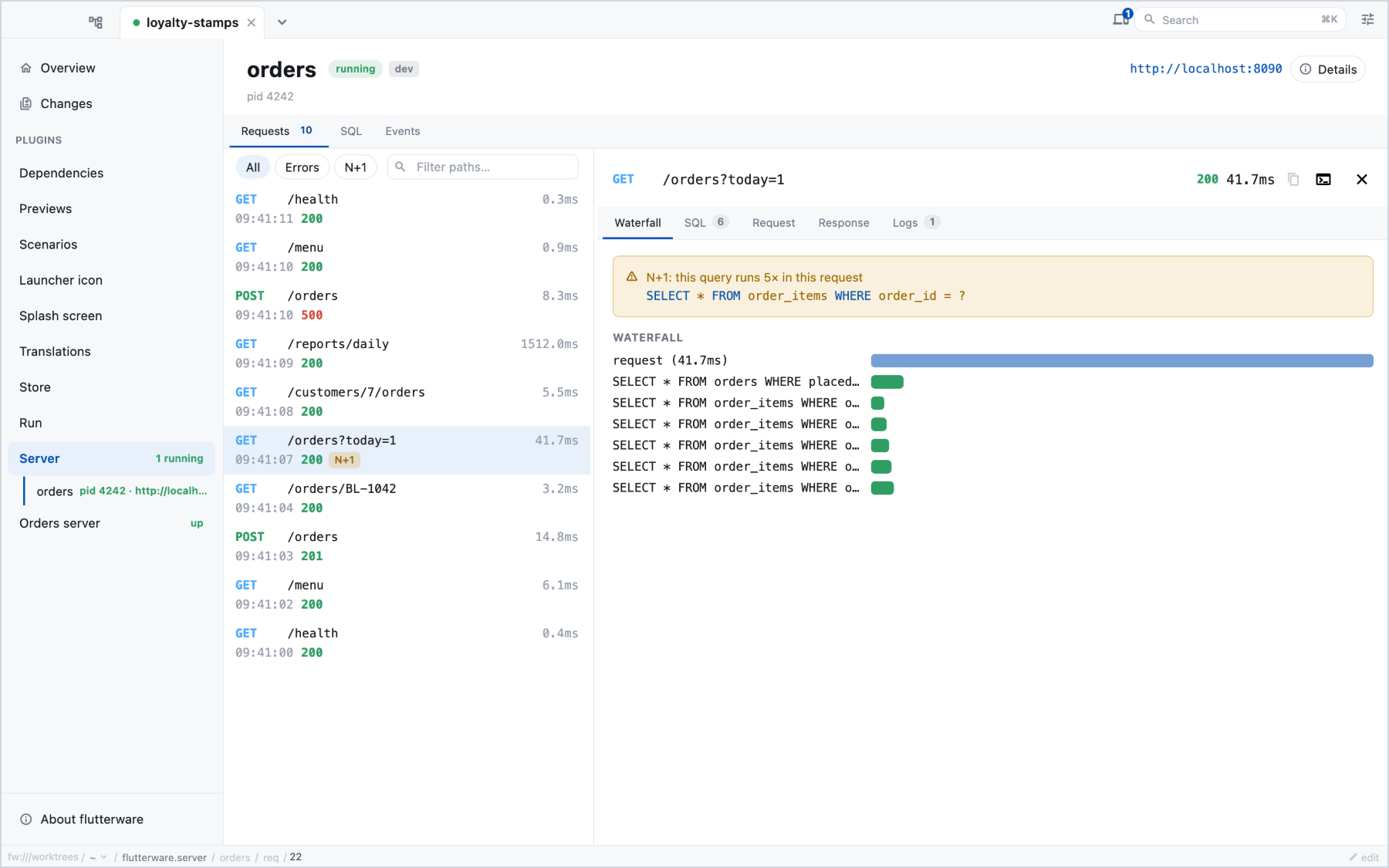
One runZoned is the whole correlation story: every query and log line
emitted below it is stamped with this request's id, which is what builds the
per-request waterfall and the N+1 badge.
import 'dart:async';
import 'package:flutterware/server.dart';
import 'package:shelf/shelf.dart';

Middleware inspect() {
  var nextRequestId = 1;
  return (inner) => (request) {
    var id = 'req-${nextRequestId++}';
    return runZoned(() async {
      var watch = Stopwatch()..start();
      try {
        var response = await inner(request);
        FlutterwareServer.event('http', {
          'method': request.method,
          'path': '/${request.url.path}',
          'status': response.statusCode,
          'ms': watch.elapsedMicroseconds / 1000,
        });
        return response;
      } on HijackException {
        // Shelf signals a hijack — a websocket upgrade, an SSE stream taking
        // the socket — by *throwing* past the middleware. It is the success
        // path. Caught below as an error, every websocket connection posts a
        // phantom 500 to the timeline, and the one it posts for is the
        // connection that worked.
        rethrow;
      } catch (e) {
        FlutterwareServer.event('http', {
          'method': request.method,
          'path': '/${request.url.path}',
          'status': 500,
          'ms': watch.elapsedMicroseconds / 1000,
          'error': '$e',
        });
        rethrow;
      }
    }, zoneValues: {
      FlutterwareServer.requestIdKey: id,
      // The tap, in a world, that this request came from.
      FlutterwareServer.stepKey: ?request.headers['x-fw-step'],
    });
  };
}

// var handler = const Pipeline().addMiddleware(inspect()).addHandler(router);
A world that hosts the server hot-reloads it on Reload, and a hot reload
gives every function its new code, but not a closure made before it, and a
router's handlers are closures made when it was built. Build it again after
each reload with FlutterwareServer.onReassemble, which the world calls once
the new code is in. The state it is built over stays:
late App app;
await shelf_io.serve((request) => app.handler(request), 'localhost', 8080);
app = App(database);
FlutterwareServer.onReassemble(() {
  unawaited(app.dispose());
  app = App(database);
});
A server whose handler is all it rebuilds has a shorter form,
FlutterwareServer.reloadable, built on the same call:
var handler = FlutterwareServer.reloadable(() => routes(store));
await shelf_io.serve(handler, 'localhost', 8080);

// A named function: a closure made before a reload keeps its old body.
Handler routes(Store store) => const Pipeline()
    .addMiddleware(inspect())
    .addHandler((Router()..get('/orders', store.list)).call);
Keep counters and caches out of what is rebuilt, in the state or a
top-level variable: a rebuilt middleware starts from nothing. An entry point
with its own hot reload, a file watcher calling back to rebuild the app, can
hand the same callback to onReassemble.
The step lasts as long as the zone does. Work the request hands off — a job
a worker runs later, a storage callback — keeps it only if you carry it:
store FlutterwareServer.step with the work, and run a job through
FlutterwareServer.job(name, body, step:, id:), which also runs it as a
request of its own and reports when it starts and ends; other work under
FlutterwareServer.inStep(step, body). The worlds
guide has the pattern.
A hijacked request is reported by nothing here, which is the honest answer:
the response never existed and the socket's life is no longer the handler's.
To see that the upgrade happened, report an event of your own before the
hijack — the correlation zone is still yours at that point.
The version in example_server.dart goes further and is the one to copy for
the Request/Response tabs: it captures redacted headers and capped
textual bodies into the event's details:. Only their delivery waits for
someone to open the tab. The map is built on every request and JSON-encoded
the moment the event is reported, then held server-side in a byte-capped
store, so the capture is a cost each request pays. The capture cut (decision
11) is what keeps it small: textual content types with a known length under
32 KB are buffered; streams and everything else are recorded as size only,
because interposing on a stream is exactly the overhead this design refuses.
Redaction lives in that snippet — in code you own — not in the library.
Logs: package:logging#
The listener runs in whatever zone called listen, so correlation must come
from record.zone — the zone the log call happened in. Without that, log
lines lose their request id.
Logger.root.onRecord.listen((record) {
  (record.zone ?? Zone.current).run(() {
    FlutterwareServer.event('log', {
      'level': record.level.name,
      'logger': record.loggerName,
      'message': record.message,
      if (record.error != null) 'error': '${record.error}',
    });
  });
});
Uncaught errors, outside any request#
The middleware already reports a handler that throws. For everything else —
timers, queue consumers, fire-and-forget futures — wrap main's body:
Future<void> main() async {
  await runZonedGuarded(() async {
    // ... start the server ...
  }, (error, stackTrace) {
    FlutterwareServer.event('log', {
      'level': 'SEVERE',
      'message': 'uncaught: $error',
      'error': '$stackTrace',
    });
  });
}
What counts as an error#
The Errors tab and the errors action admit three things, and only the first
is about the response:
- an
httpevent whosestatusis 500 or more; - a
logevent atSEVEREorSHOUT; - any event carrying an
errorkey, on any channel.
So what lands there depends on how your project logs, not only on what it
answered. A 403 whose handler logs with error: attached shows up — through
the third rule, not the first. A 4xx handler that logs at INFO with no error
attached shows up nowhere, for a request that failed. That is deliberate: a 404
is traffic, not a fault, and only your code knows which of yours are which.
Attach error: to the log line for the ones that are.
When the question really is about the status, ask it directly:
errors takes minStatus, which replaces the three rules above with that one
comparison — minStatus: 400 is every request that failed, whatever the logger
was doing.
SQL: drift#
QueryInterceptor is the one hook that sees every statement. The explain
and requery handlers run inside your server, on your own connection —
that is why the GUI needs no driver and no credentials to show a real plan.
Report the statement as the driver received it, and report its parameters
beside it. Substituting values into the text would break the grouping the SQL
tab is built on — normalizeSql gathers occurrences by shape, and an N+1 is
exactly a set of queries differing only in their literals. So $1 / @name /
? stay where they are, which means the text alone will not run: EXPLAIN on
it fails, because a parameter has no meaning outside a prepared statement.
A command is therefore invoked with params as well as query — the chosen
occurrence's own, as your span reported them — and every handler below binds
them rather than interpolating. A statement that took no parameters arrives
without the key.
Report them in the shape your driver binds: a list where the placeholders are
positional, a map where they are named. parameters.values.toList() on a
named query throws the names away, and the names are the half that binds back.
import 'package:drift/drift.dart';
import 'package:flutterware/server.dart';

class InspectingInterceptor extends QueryInterceptor {
  @override
  Future<T> _run<T>(String sql, List<Object?> args, Future<T> Function() body) {
    return FlutterwareServer.span('sql', {
      'query': sql,
      if (args.isNotEmpty) 'params': args,
    }, body);
    // For selects, prefer reporting the row count too — it is what the
    // occurrence rows show: run the body yourself, then
    // FlutterwareServer.event('sql', {..., 'rows': result.length, 'ms': …}).
  }

  @override
  Future<List<Map<String, Object?>>> runSelect(
    QueryExecutor executor,
    String statement,
    List<Object?> args,
  ) => _run(statement, args, () => executor.runSelect(statement, args));

  // Override runInsert / runUpdate / runDelete / runCustom the same way.
}

// db = MyDatabase(executor.interceptWith(InspectingInterceptor()));

void registerSqlCommands(MyDatabase db) {
  FlutterwareServer.handle('sql', 'explain', (params) async {
    var rows = await db
        .customSelect(
          'EXPLAIN QUERY PLAN ${params['query']}',
          variables: _bind(params['params']),
        )
        .get();
    return {'plan': [for (var row in rows) row.data]};
  });
  FlutterwareServer.handle('sql', 'requery', (params) async {
    var rows = await db
        .customSelect(
          params['query']! as String,
          variables: _bind(params['params']),
        )
        .get();
    return {'rows': [for (var row in rows.take(50)) row.data]};
  });
}

/// The parameters as they crossed the wire, back into drift variables. They
/// arrive JSON-shaped, so a `DateTime` is the string the reporter recorded —
/// good enough for a plan, and the reason `requery` is for dev databases.
List<Variable> _bind(Object? reported) => [
  for (var value in reported as List? ?? const []) Variable(value),
];
SQL: package:postgres#
import 'package:flutterware/server.dart';
import 'package:postgres/postgres.dart';

Future<Result> query(
  Connection connection,
  String sql, {
  Map<String, Object?>? parameters,
}) {
  return FlutterwareServer.span('sql', {
    'query': sql,
    // The map, not `parameters.values.toList()`: this query is named, so a
    // list is the half of it that cannot be bound back.
    if (parameters != null) 'params': parameters,
  }, () => connection.execute(Sql.named(sql), parameters: parameters));
}

void registerSqlCommands(Connection connection) {
  FlutterwareServer.handle('sql', 'explain', (params) async {
    var rows = await connection.execute(
      Sql.named('EXPLAIN ANALYZE ${params['query']}'),
      parameters: (params['params'] as Map?)?.cast<String, Object?>(),
    );
    return {'plan': [for (var row in rows) row.first]};
  });
  FlutterwareServer.handle('sql', 'requery', (params) async {
    var rows = await connection.execute(
      Sql.named(params['query']! as String),
      parameters: (params['params'] as Map?)?.cast<String, Object?>(),
    );
    return {'rows': [for (var row in rows.take(50)) row.toColumnMap()]};
  });
}
EXPLAIN ANALYZE executes the query. For statements with side effects,
or on data you care about, use plain EXPLAIN instead.
SQL: package:sqlite3#
import 'package:flutterware/server.dart';
import 'package:sqlite3/sqlite3.dart';

ResultSet query(Database db, String sql, [List<Object?> params = const []]) {
  return FlutterwareServer.spanSync('sql', {
    'query': sql,
    if (params.isNotEmpty) 'params': params,
  }, () => db.select(sql, params));
}

void registerSqlCommands(Database db) {
  FlutterwareServer.handle('sql', 'explain', (params) {
    var rows = db.select(
      'EXPLAIN QUERY PLAN ${params['query']}',
      _bind(params['params']),
    );
    return {'plan': [for (var row in rows) row['detail']]};
  });
  FlutterwareServer.handle('sql', 'requery', (params) {
    var rows = db.select(params['query']! as String, _bind(params['params']));
    return {'rows': rows.take(50).toList()};
  });
}

List<Object?> _bind(Object? reported) => [...?reported as List?];
HTTP out: the other half of a slow endpoint#
Outgoing calls your handlers make, reported into the same waterfall:
import 'package:http/http.dart' as http;
import 'package:flutterware/server.dart';

class InspectingClient extends http.BaseClient {
  InspectingClient(this._inner);
  final http.Client _inner;

  @override
  Future<http.StreamedResponse> send(http.BaseRequest request) {
    return FlutterwareServer.span('http-out', {
      'method': request.method,
      'url': '${request.url}',
    }, () => _inner.send(request));
  }
}
Notes that apply to every snippet#
-
Redaction is yours: before reporting headers or parameters, drop what must not leave the process. The snippets above report no headers for exactly that reason — add them consciously.
Build the list by grepping your handlers for the headers they read, not from a list of usual suspects.
Authorization,Cookieand password fields are where everyone starts and where no real server ends: a project that acceptsx-authorizationas a fallback forauthorizationhas a credential no outside list names, and it is one grep away from being found. The same grep catches the other half — ax-publishable-keyis publishable, and redacting it costs you which integrator a request came from, which is half of why anyone opens the panel. Redact what your code treats as a secret; leave what it treats as an identity. -
requeryre-executes the statement. Registering it for a toy or a local dev database is convenient; think before registering it against anything shared. -
Every handler answer must be JSON-encodable; cap row counts (
take(50)) — the wire is for inspection, not for bulk export.