 flutterware
Translations
Every translation key in every language, and a picture of where each string appears in your app. Translations also tells you which keys are missing in a language, which the app never uses, and which are too long for the screen.
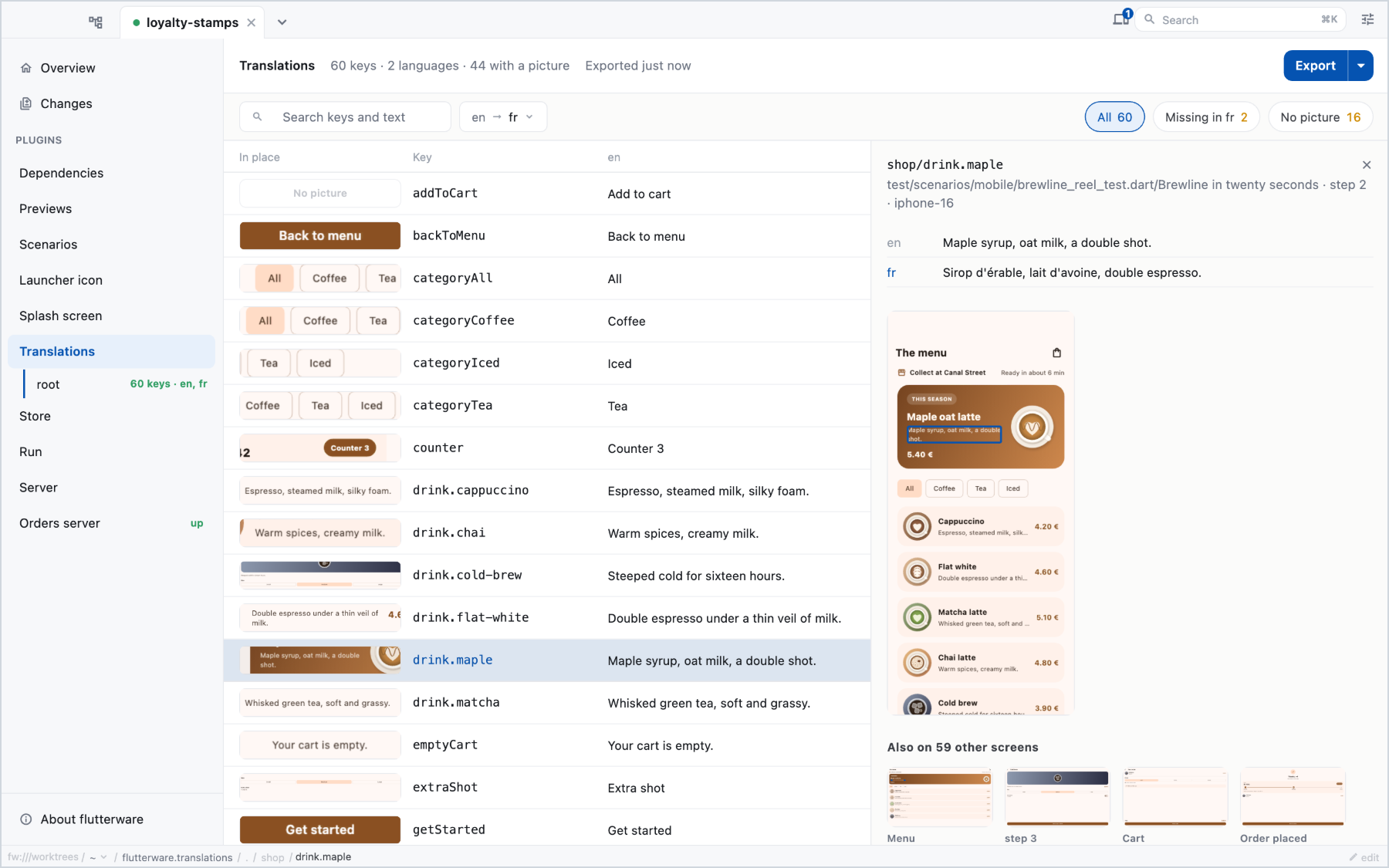
The pictures come from your scenarios: while they run, flutterware records which key produced which words on which screen.
Turn it on#
// tool/flutterware.dart
fw.use(
  Translations(
    packages: [
      TranslationsPackage(
        app,
        catalogs: [
          TranslationCatalog(name: 'shop', files: 'assets/i18n/*.json'),
        ],
      ),
    ],
  ),
);
A catalog is where your strings live. Two layouts are supported:
- One file per language, each a flat JSON object of key to text:
assets/i18n/en.jsonholding{"addToCart": "Add to cart"}. The file name is the language. This isTranslationCatalog(files: …). - One file with every language under each key:
{"addToCart": {"en": "Add to cart", "fr": "Ajouter au panier"}}. This isTranslationCatalog.localesPerKey(file: …).
template: names the language your source text is written in (English by
default). A key missing from another language falls back to it, and the table
flags that.
The table and the missing-key count work from the files alone. The pictures need one more step.
Connect your strings to the screen#
To know which key a piece of text came from, flutterware needs to see each string as it leaves your catalog. Most apps already read every string through one function, so the hook goes there:
class ShopStrings {
  ShopStrings(this._values, this._fallback);

  /// Null in the app. Scenario runs set it.
  static String Function(String key, String value)? wrapValue;

  final Map<String, String> _values;
  final Map<String, String> _fallback;

  String read(String key) {
    var value = _values[key] ?? _fallback[key] ?? '';
    return wrapValue?.call(key, value) ?? value;
  }
}
Then, in the flutter_test_config.dart of your scenario folder:
Future<void> testExecutable(FutureOr<void> Function() testMain) {
  ShopStrings.wrapValue = indexTranslations('shop');
  return runScenarios(testMain);
}
The name passed to indexTranslations is the catalog's name:. Nothing is
added to the text and no pixel moves: the string is matched by identity. In
the app the hook is null and costs nothing.
Two helpers cover the less common cases:
indexExpansions('shop')for strings your catalog builds from a template, like'Thanks, $name!'.indexTranslationsIn<MyMarkdown>((w) => w.data)for a widget that draws text without aTextwidget.
Export for translators#
fw run translations export
fw run translations export --languages=en,fr,de --device=iphone-16
fw run translations export --max-lengths=true
The export runs your scenarios and writes build/translations/: one
screenshot per screen, a keys.json saying where each key was seen (with its
box on the screenshot), and an index.html a translator can open. Nothing is
cropped or drawn on the pictures, so the same files can be pushed to a
translation service. package:flutterware/translations.dart reads
keys.json back, typed, for the script that does the push.
--max-lengths=true measures how long each string can get before it stops
fitting: it re-runs the suite with every string padded, on the narrowest device
your scenario folders declare, and records the longest length that still fit,
with a picture of where it broke.
The export exits non-zero when something is wrong, so it can gate a CI job.